Every job. Organised, tracked, and invoiced.
From the moment a job is created to the moment the invoice is paid, LoadHub keeps everything moving — without the phone calls, the spreadsheet updates, or the dropped balls.
Create a job in seconds
Customer, addresses, load details. One form, one reference, nothing missed.
Schedule it on the jobs calendar
See every job at a glance, spot gaps, and prevent double-bookings before they happen.
Driver gets the job automatically
They open LoadHub Fleet, see what's next, and navigate straight there. No phone call needed.
Office sees every update in real time
Job stop arrivals, completions, and GPS location all updated to your live map the moment they happen.
Job complete → invoice in one click
All details carry across automatically. No re-keying, no gaps.
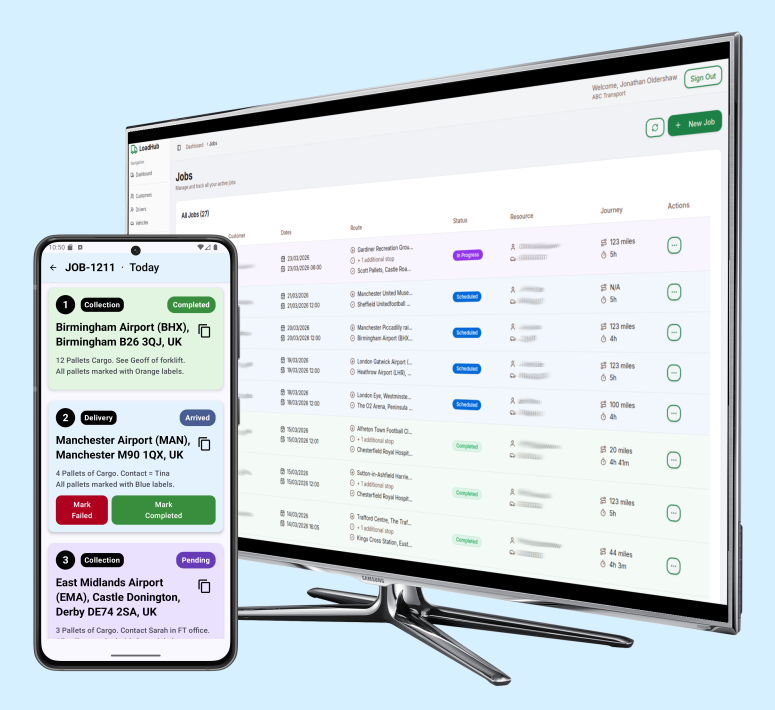
Nothing falls through the gaps.
Every job follows a clear path from creation to completion.
LoadHub manages the workflow — so you don't have to chase it.
Every job follows a clear path
Created, scheduled, in progress, completed, invoiced. The system only allows valid moves forward — nothing gets stuck, skipped, or lost by accident.
Drivers and vehicles assigned in seconds
Link each job to the right driver and vehicle. The system tracks what's allocated and flags anything that conflicts.
Schedule jobs on the calendar
Assign jobs to drivers and time slots quickly. Start and end times calculate automatically based on job duration.
Double-bookings flagged before they happen
If two jobs clash on the same driver or vehicle, LoadHub flags it immediately with a visual warning. You'll know before it becomes a problem on the road.Change anything in seconds
Update job details, swap the driver, adjust timing — all without leaving the scheduler. Open any job card to edit and save in seconds.Job complete → invoice ready in one click
When a job reaches "Ready for Invoice," promote it and every detail transfers automatically. No re-entering customer information, route details, or pricing.

Fewer phone calls. Fewer mistakes.
Every job accounted for, from first booking to final payment.